What is Gothic Text (Gothic Font)?
Gothic Fonts Generator helps you turn simple writing into bold, historic-looking gothic text. But first, let’s understand what a Gothic font really is.
Gothic typography, which includes stylish fonts, comes from the blackletter family. You may also hear it called a blackletter font or blackletter text. Styles like fraktur, old english, and classic blackletter are part of the wider gothic blackletter tradition. This tradition is historically grounded, utilizing our cute fonts library styles, and often feels institutionally authoritative.
In the middle ages and renaissance, scribes used manuscript lettering in every medieval manuscript and illuminated manuscript. The writing showed:
- Bold letterforms
- Sharp strokes
- Angular strokes
- Thick strokes and thin strokes
- Intricate, ornate details
These distinct characters gave Gothic lettering a distinctive style with strong heritage, similar to cool fonts and classic traditions. It carried historical charm and a classical feel across many European languages.
Key Visual Traits
| Feature | Description |
|---|---|
| Angular text | Tight, sharp structure |
| Bold serif | Heavy vertical emphasis |
| Ornate style | Decorative elements for decorative purposes |
| Dark text | Dense, dramatic tone |
Gothic letters A-Z often look like unique letterlike characters. Today, these letters and characters exist as unicode characters with specific character codes and even unique character codes used in mathematics or mathematical letters.
Modern Use
Modern gothic styles evolved from printing history and historical context. Some use serif fonts, others mix with sans serif fonts. You may see:
- Modern gothic font (simplified version)
- Cursive styles
- Italic or italics
- italic fonts text
- Small caps and small caps text
- Caps text
- Different text script options
Designers use Gothic font styles in book covers, editorial layouts, vintage-inspired designs, and heavy metal graphics. The dramatic font feel creates a masculine look and forceful look. It works well inside a larger design system with multiple font types.
The difference between traditional black letter text and a modern font version often comes down to blackletter complexity and readability. Still, every gothic style family shares the same origins in medieval gothic writing.
When you use our Gothic Fonts Generator, you connect to that history while using a compatible font built on unicode for modern platforms.
What is a Gothic Text Generator?
A gothic font generator, also called a gothic text generator or gothic letters generator, is a simple text tool. You enter regular text into a text field. The system uses unicode conversion to convert it into a gothic style output.
Our Gothic Fonts Generator works as:
- A font generator
- A text generator
- A font tool generator
- A fancy fonts generator
- A cursive fonts generator
It acts as an online generator and live generator. You get a live preview and real-time previews. In many cases, you preview pretty fonts instantly with batch preview options.
How It Works
You add input text.
- The converter runs text conversion.
- It replaces letters with unicode text and special characters.
- You copy and paste the formatted text.
- You can right click or use a keyboard shortcut to copy to your clipboard.
Style Options
You can toggle and select style across many gothic styles. You may see:
- bold fonts text and bold gothic
- Cursed text
- Cursive or cursive text
- Italic text
- Small text or subscript
- Bubble text
- Circled text
- Backwards text
- Upside down text
- Even a strikethrough text generator option
It also works as a character generator or username generator. Some users need an invisible character generator or empty character for profile customization.
Where It Works
Because it uses unicode characters, it stays platform-ready and acts like a compatible font across:
- Desktop browser and mobile
- Devices and apps
- Digital platforms
- Social media
- Games and online games
- Messenger, sms messages, and chat
- Comments, posts, profiles, profile names
- Usernames, bio text, captions
- Emails or a tweet
- Daily chats and comment sections
The goal is simple: help your text stand out, grab attention during scrolling, and catch human eyes with obscure characters and unique character codes.
You get immediate output with speed and confidence. You can also download export-ready lettering using export tools in png or svg format for copy-ready lettering.
That is what makes this Gothic Fonts Generator more than a novelty converter—it’s a practical unicode text tool built for real use.
How to Use the Gothic Text Generator (3 Simple Steps)
Using the Gothic Fonts Generator is easy. Follow these 3 steps.
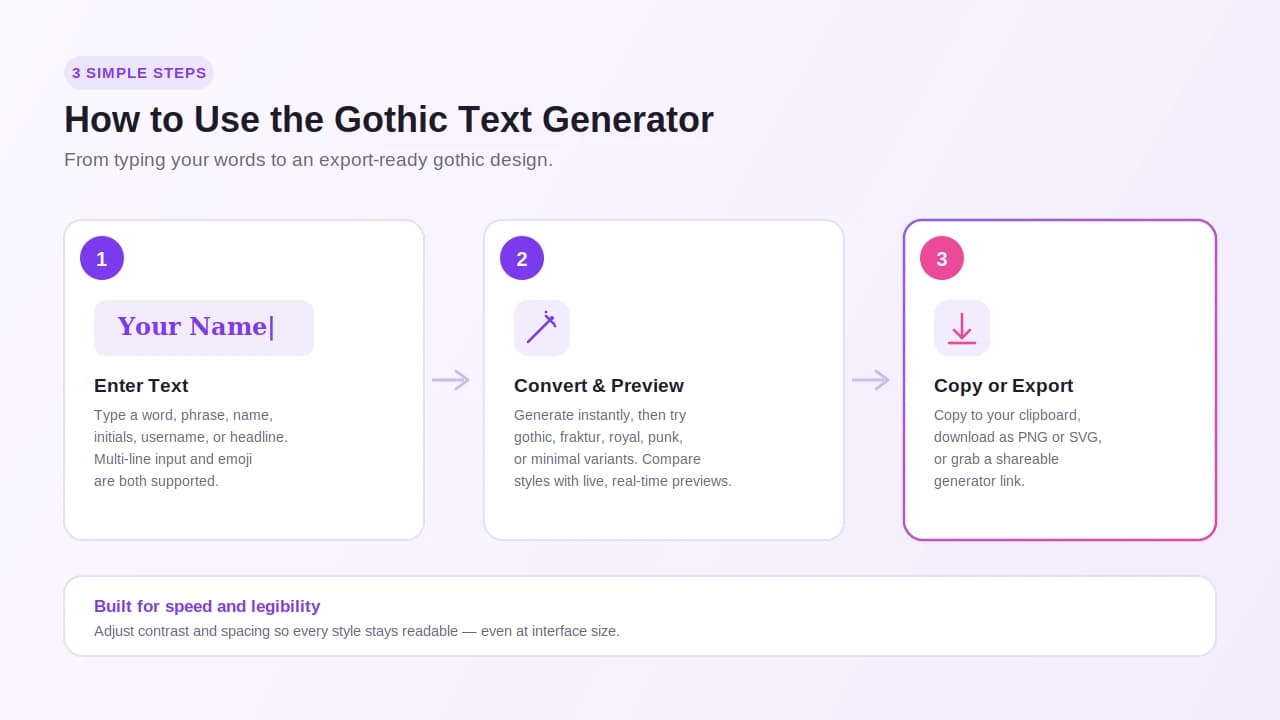
Step 1: Enter Text
- Enter text in the text field.
- Type text like a word, phrase, name, initials, username, or headline.
- Use multi-line input if needed.
- Add emoji if you want.
This is your input stage.
Step 2: Convert and Preview
Click to generate or create your design. The system will convert your text using unicode text and unicode characters from character tables and character codes.
Next, select style. You can try:
- Gothic style
- Bold fraktur
- Royal
- Punk
- Minimal
- Luxury variation
- Modern minimalist variant
- Dense blackletter
- Alternating fraktur
- Bold fraktur
Use comparison cards to compare styles. The live preview and real-time previews update instantly.
Then customize:
- Size and width with size controls
- Color and color controls
- Background or dramatic backgrounds
- Alignment
- Letter spacing
- Shadow
- Decorative framing
Adjust contrast, atmosphere, silhouette, and restraint. Check readability and make sure the text is legible, even as interface-sized text.
This testing workflow gives practical controls while showing tradeoffs between drama and clarity.
Step 3: Copy or Export
When ready:
- Copy and paste using your clipboard.
- Use right click or a keyboard shortcut.
- Paste into your favorite platform.
- Post text for publishing.
You can also download in png or svg format. Use export assets for a production-ready reference. Share shareable generator links if needed.
Everything is platform-ready and built for compatibility across devices. If you have platform questions or device questions, we provide guidance and scene-specific guidance through our matching guide.
This workflow supports real workflows with speed, confidence, and immediate output.
Gothic Font Styles Compared
Not all gothic fonts look the same. When you compare styles, you see clear differences inside each style family.
Traditional Families
- Classic blackletter and blackletter classic
- Fraktur and heavier fraktur variant
- Dense blackletter
- Medieval gothic with manuscript-era personality
These styles often include cross separators and ceremonial treatment. They resemble ceremonial mastheads from illuminated manuscript history. They send a strong traditional signal.
Modern and Creative Styles
- Modern gothic styles
- Fantasy-leaning styles
- Luxury scripts
- Dark editorial display
- Bold gothic styles
- Romantic gothic lettering
- Gothic serif with a serif-forward style
- Minimal gothic or stripped-back display style
Modern versions focus on structural clarity, premium restraint, and contemporary refinement. Some use a simplified version of a modern font.
Visual Comparison
| Feature | Traditional | Modern |
|---|---|---|
| Blackletter complexity | High | Reduced |
| Readability | Medium | More readable |
| Atmosphere | Dark, dramatic | Balanced |
| Interface use | Limited | Interface-sized text friendly |
You may also see:
- Gothic bold
- Contrast and shadow
- Strong silhouette
- Glyph novelty
- Punk treatments
- Poster or channel-art territory use
- Brand marks and gaming tags
- Social-name needs
Some even look like a ransom note or cuniform-inspired structure.
The difference comes down to design intention, gothic treatment, and font pairings. Pairing fonts like serif fonts, sans serif fonts, bold serif, cursive script, italic, or small caps adds visual interest.
Our novelty converter inside the Gothic Fonts Generator lets you test each distinctive style before you commit.
How to Choose the Right Gothic Style for Your Project
Every project has a different project scope. So first, define your message and medium.
Ask yourself:
- Do I want a bold, dramatic font?
- Do I need premium restraint?
- Should it feel institutionally authoritative?
- Or more modern with contemporary refinement?
For Branding
Brand designers and any designer creating logos or brand marks often use our gothic logo font generator. It helps shape logo concepts and logo idea drafts.
For heritage branding, choose a traditional signal style. For a luxury variation inside a dark luxury interface, use a refined look.
For Digital Design
In web design, layouts, or web art, check compatibility across devices, platforms, and browsers. Modern interfaces need readable text with good contrast and atmosphere.
Inside a design system, balance decorative elements with legible structure. Consider tradeoffs between distinct design and usability.
Practical Workflow
Use our:
- Use-case guides
- Project-specific pages
- Use-case pages
- Workflow guide
- Testing workflow
- Matching guide
Explore font detail pages, supporting content, and linked guides inside our resource map. Navigate site sections from the homepage to the font library and content library.
Before publishing, export assets in platform-ready formats. Keep references and print references as a production-ready reference.
Choose a style that fits your mood, styling, and aesthetic fonts and aesthetic text needs. The goal is simple: make a strong impression, create emphasis, and help your message stand out with attention and readability.
Where to Use Gothic Text: Social Media, Games, and More
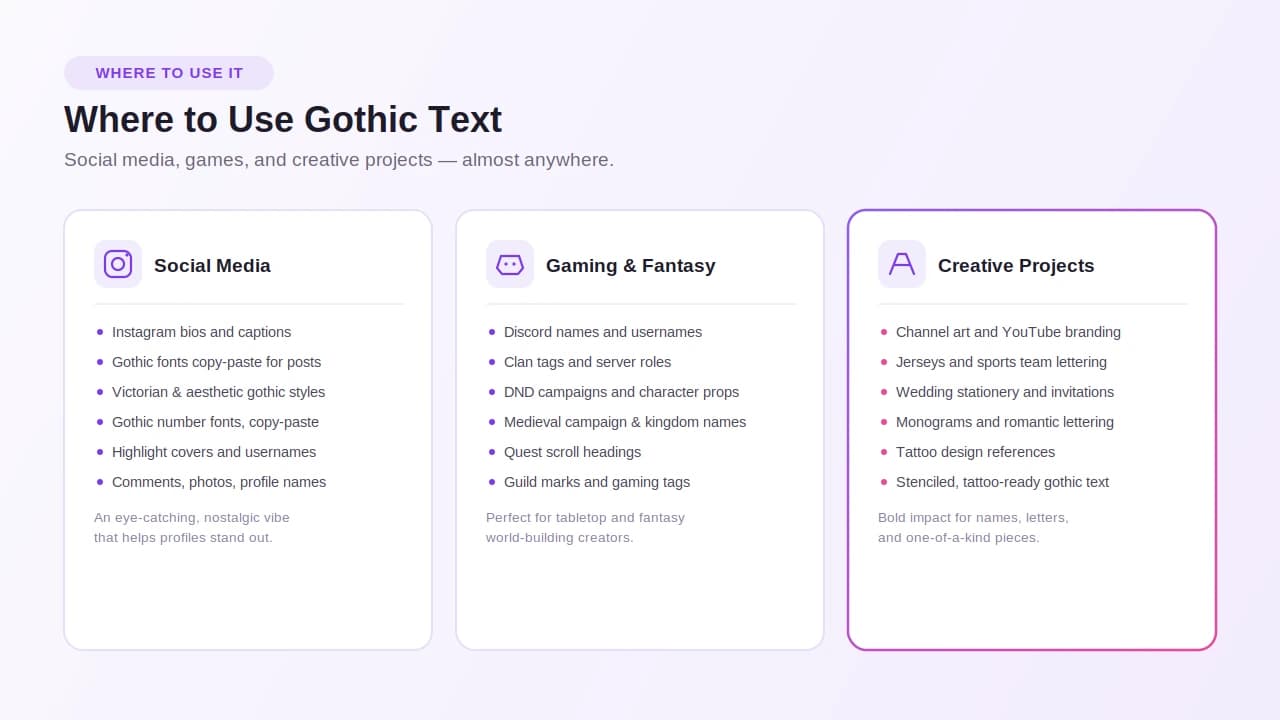
Social Media
For social media posts, profiles, and social profiles:
- Instagram bio and instagram bios
- Gothic fonts copy paste for instagram
- Victorian gothic fonts copy paste
- Aesthetic gothic fonts copy paste
- Gothic numbers font copy paste
- gothic numbers font copy paste
- gothic font numbers copy and paste instagram
- Gothic font numbers copy and paste Instagram
Use them in bios, captions, highlight covers, comments, photos, and usernames. Update profile names to grab followers. Add a unique vibe that feels eye-catching and nostalgic.
Gaming and Fantasy
For games and online games:
- Discord names and discord usernames
- Clan tags and server roles
- Gaming tags
- DND campaigns and dnd props
- Medieval campaign titles
- Kingdom names
- Quest scroll headings
- Guild marks
Perfect for tabletop fantasy creators building fantasy worlds and fantasy world-building themes.
Creative Projects
- Channel art and youtube branding
- Jerseys and sports jerseys
- Wedding stationery and wedding invitations
- Invitations, monograms, vow books, evening stationery
- Romantic gothic lettering
- Tattoos, tattoo fonts design, tattoo designs
- Tattoo-inspired art and tattoo-ready gothic text
- Tattoo artists use tattoo references for a stenciled look
- Create a name or letter with bold impact
You can export-ready lettering or copy-ready lettering for print references or digital content. Use it in artistic creations for decorative purposes.
Even in apps, messages, messenger, sms messages, emails, chat, or online chat, gothic text helps you revamp your planner or digital notebook.
It adds heavy metal energy or soft romantic tones—whatever mood you want.
History and Origins of Gothic Fonts
The history of the gothic font starts in the medieval ages. During medieval times and the middle ages, scribes shaped writing for european languages using intricate strokes.
This font history connects to:
- Medieval manuscript work
- Illuminated manuscript art
- Early printing
- Strong tradition and heritage
The gothic blackletter tradition developed distinctive style rules:
- Angular strokes
- Sharp strokes
- Bold letterforms
- Thick strokes and thin strokes
- Ornate style with decorative elements
These details created blackletter complexity with historical charm and classical feel.
During the renaissance, printing spread classic blackletter and fraktur across regions. Old english forms became widely recognized.
Over time, modern typefaces introduced a simplified version. Modern gothic styles and modern font variations balanced readability with mystery, dark tone, and dramatic structure.
Today, designers use gothic aesthetics in book covers, editorial layouts, and vintage-inspired designs. Typography exploration continues through educational history content and every history article we publish.
When you type gothic text into our Gothic Fonts Generator, you use a digital version of that same heritage—adapted for modern design.
Explore More Gothic Font Resources
Beyond the tool, we built a full resource map.
Start at the homepage. Then explore site sections like:
- Font library
- Content library
- Font detail pages
- Project-specific pages
- Use-case pages
- Supporting content
- Linked guides
Use our workflow guide, use-case guides, and matching guide. Read our history article and other educational history content.
Tools and Downloads
- Gothic font download options
- Free fonts
- Export tools
- Export in png or svg
- Production-ready reference files
- Print references
- Shareable generator links
Try:
- Gothic font generator
- Old English Gothic font generator
- Victorian Gothic font generator
- victorian gothic font generator
- old english gothic font generator
- gothic logo font generator
Browse stunning gothic fonts and explore gothic style copy with easy copy and paste features. All fonts copy paste options support unicode text, unicode characters, character tables, and character codes.
Everything is platform-ready. We cover compatibility, platform questions, and device questions inside support pages and frequently asked questions.
If you need help, visit the contact page. Send bug reports, corrections, privacy requests, or ask about partnerships.
Our goal is a connected experience with real workflows, strong style coverage, and deep content depth. We also feature local favorites for quick access.
FAQs
Is the Gothic Font Generator free to use?
Yes. Our gothic font generator is free. It works as a free tool and online tool directly in your web tool dashboard.
You can use instant font generators without payment. You can download and export files in png or svg format. It works across platforms and browsers on desktop browser or mobile devices.
We keep compatibility strong for easy publishing. Check our faq answers section for more details.
Do Gothic fonts work on all devices?
Most styles work across devices because we use unicode and unicode characters. These rely on character codes and sometimes unique character codes.
However, some obscure characters may look slightly different across platforms, browsers, or apps. That’s normal with unicode text.
We test formatted text across digital platforms and modern interfaces. If you have device questions or platform questions, review our compatibility notes.
Can I download Gothic fonts as images?
Yes. You can download images in png or svg format. Use export tools to create export assets.
These files act as a production-ready reference for print references and publishing. They are perfect when you need copy-ready lettering or export-ready lettering.
What’s the difference between Gothic and Blackletter fonts?
The difference between a gothic font and blackletter fonts often relates to naming.
Blackletter font and blackletter text describe the historical writing system. Gothic text is a modern label for styles from the gothic blackletter tradition.
Forms like fraktur and old english belong to classic blackletter or blackletter classic families. Over time, designers added gothic serif and serif-forward style options.
Modern font versions may use a simplified version to reduce blackletter complexity. Understanding the history and historical context helps clarify the difference.
What is Old English font?
Old english is a form of classic blackletter linked to medieval manuscript and illuminated manuscript writing.
Today, you can generate it using the Old English Gothic font generator or old english gothic font generator.
It reflects tradition and heritage with gothic aesthetics, distinctive style, angular strokes, and ornate details.
How do I use Gothic fonts for an Instagram bio?
To update your Instagram bio:
- Use Gothic fonts copy paste for instagram.
- Try gothic numbers font copy paste.
- Test gothic font numbers copy and paste instagram or Gothic font numbers copy and paste Instagram options.
- Copy and paste the unicode text into your bio text.
You can also update captions, usernames, and profiles across social media. Make sure the style uses a compatible font format.
The goal is to stand out, grab attention, and create a unique vibe inside your bios.